Intended to showcase the possibilities of the WTX project rather than serve as a production tool. In regards to the exchange of remote data most embedded devices resort to
MQTT.
The last post about embedded is outdated: The WTX crate introduced breaking changes, the Embassy project introduced breaking changes and the ESP crates introduced breaking changes.
This post will probably also become outdated in the following years but it will at least deliver yet another never-done-before use-case: Make an ESP32 board process HTTP/2 requests over TLS 1.3 using Rust.
Well, at least I am not aware of anyone else that did this before so let me know if I am mistaken.
Topics are organized as introductory explanations followed by code comments. The full project is available at data.tar.xz.
Technologies
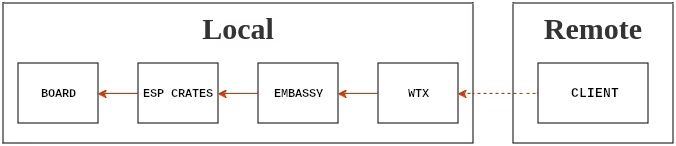
Board
This project is implemented on the ESP32-WROVER-E, a 32-bit dual-core development board with Wi-Fi, 448 KiB of ROM, 520 KiB of RAM, Bluetooth, 4 MiB of Flash, built-in PCB antenna, 40 different pins, a camera and several other features. Quite affordable considering the place where I live.
Broadly speaking, ESP32 is a series of low-cost, low-power system-on-chip microcontrollers created and developed by Espressif Systems, a Chinese company based in Shanghai.
ESP crates
The embedded world is generally dominated by C toolchains but thankfully we are now witnessing a growing shift towards Rust-based alternatives. Moreover, Espressif Systems provides official libraries, documentation and tools that can help creating, compiling, debugging and deploying binaries.
Taking advantage of the official Rust crates, we are going to use them to basically communicate with the hardware.
- Bootstrap the application.
- Connect to a local network using the Wi-Fi.
- Generate random seeds suitable for cryptographic operations.
- Reserve memory for heap allocations.
Embassy
Embassy is a modern embedded framework offering high-level async interfaces for bare-metal hardware. Here we use embassy-executor, embassy-net and embassy-time to manage the runtime, TCP streams and elapsed time.
WTX
WTX is, among other things, a RFC5280, RFC6455, RFC9113 and RFC9846 implementation intended to allow the development of web applications through a built-in server framework, a built-in PostgreSQL connector, a built-in WebSocket handler and a built-in gRPC manager. There is also a built-in API client framework that facilitates the maintainability of large endpoints.
Some associated benchmarks are available at https://github.com/MDA2AV/HttpArena, https://github.com/diesel-rs/metrics and https://c410-f3r.github.io/wtx-bench.
Certificates
This section is mandatory! Without a custom certificate the server will not work on local networks!
WTX has a strict set of X.509 rules derived from the x509-limbo testsuite that prevents the utilization of files created from a default OpenSSL CLI template, as such, it is necessary to provide additional information to forge certificates.
The recurring stumbling block is that Intermediate CAs or Root CAs need a Subject Key Identifier and if an Authority Key Identifier extension exists in a self-signed certificate, it must match the SKI.
CERTS_DIR="$(dirname $0)/../.certs"

openssl genpkey -algorithm ed25519 -out $CERTS_DIR/key.pem
openssl req -new -key $CERTS_DIR/key.pem -subj "/C=FI/CN=vahid" -out $CERTS_DIR/key.csr
openssl genpkey -algorithm ed25519 -out $CERTS_DIR/root-ca.key
openssl req -x509 -sha256 -days 3650 -subj "/C=FI/CN=vahid Root CA" \
  -key $CERTS_DIR/root-ca.key \
  -out $CERTS_DIR/root-ca.crt \
  -addext "authorityKeyIdentifier=keyid:always,issuer" \
  -addext "basicConstraints=critical,CA:TRUE" \
  -addext "subjectKeyIdentifier=hash"
cat <<'EOF' > $CERTS_DIR/localhost.ext
authorityKeyIdentifier=keyid,issuer
basicConstraints=CA:FALSE
subjectAltName = @alt_names
subjectKeyIdentifier=hash
[alt_names]
DNS.1 = localhost
IP.1 = 127.0.0.1
IP.2 = BOARD_IP <------ !!!!! Replace "BOARD_IP" with the ip assigned in you network !!!!!
EOF
openssl x509 -req -CA $CERTS_DIR/root-ca.crt -CAkey $CERTS_DIR/root-ca.key \
  -in $CERTS_DIR/key.csr -out $CERTS_DIR/cert.pem \
  -days 398 -CAcreateserial -extfile $CERTS_DIR/localhost.ext
cat $CERTS_DIR/cert.pem $CERTS_DIR/root-ca.crt > $CERTS_DIR/fullchain.pem
rm $CERTS_DIR/key.csr
rm $CERTS_DIR/localhost.ext
rm $CERTS_DIR/root-ca.srl
Replace BOARD_IP with the IP your board gets at runtime or switch from DHCP to a static IP.
You can find a longer explanation about the additional files that are required to make the code build in the last post about embedded or dive into the project's directory. For a quick review, .cargo/config.toml, rust-toolchain and build.rs demand special handling.
Code comments
Just a few notes to clarify what is going on. In the end the application will listen to connections on port 9000 to deliver a simple "Hello World" from GET requests.
Initialization
According to esp-hal, esp_hal::rng::Rng produces random numbers suitable for cryptographic and general-purpose use as long as an RF subsystem or ADC is active. Since we use the built-in Wi-Fi the result should be safe for the public environments.
async fn init_peripherals(spawner: &Spawner) -> (ChaCha20, Stack<'static>) {
  let config = esp_hal::Config::default().with_cpu_clock(CpuClock::max());
  let peripherals = esp_hal::init(config);
  esp_alloc::heap_allocator!(#[esp_hal::ram(reclaimed)] size: 96000);

  let timg0 = TimerGroup::new(peripherals.TIMG0);
  let sw_interrupt = SoftwareInterruptControl::new(peripherals.SW_INTERRUPT);
  esp_rtos::start(timg0.timer0, sw_interrupt.software_interrupt0);

  let esp_rng = esp_hal::rng::Rng::new();
  let mut seed = [0u8; 32];
  for chunk in seed.chunks_mut(4) {
    chunk.copy_from_slice(&esp_rng.random().to_ne_bytes());
  }
  let mut rng = ChaCha20::from_key(seed);

  let (wifi_controller, interfaces) = wifi::new(peripherals.WIFI, <_>::default()).unwrap();
  let (stack, runner) = embassy_net::new(
    interfaces.station,
    embassy_net::Config::dhcpv4(Default::default()),
    STACK_RESOURCES.init(StackResources::new()),
    u64::from_be_bytes(rng.u8_8()),
  );

  spawner.spawn(net_task(runner).unwrap());
  spawner.spawn(wifi_task(wifi_controller).unwrap());

  log::debug!("Waiting for network");
  stack.wait_config_up().await;
  log::debug!("Got IP: {}", stack.config_v4().unwrap().address);

  (rng, stack)
}
The rest of init_peripherals boots the hardware and reserves heap space, which is mandatory.
#[embassy_executor::task]
async fn net_task(mut runner: Runner<'static, Interface<'static>>) -> ! {
  runner.run().await
}

#[embassy_executor::task]
async fn wifi_task(mut controller: WifiController<'static>) {
  let config = wifi::Config::Station(
    StationConfig::default().with_ssid(WIFI_SSID).with_password(WIFI_PW.into()),
  );
  controller.set_config(&config).unwrap();
  log::debug!("Initializing connecting with WiFi");
  loop {
    match controller.connect_async().await {
      Ok(_) => break,
      Err(err) => {
        log::debug!("Attempt to connect to WiFi resulted in an error: {err:?}");
        Timer::after(Duration::from_millis(2000)).await;
        continue;
      }
    }
  }
  log::debug!("WiFi connection has been successfully established");
  let _ = controller.wait_for_disconnect_async().await;
}
net_task and wifi_task run in the background for the lifetime of the application.
Epoch Synchronization
Certificates expire, so the application must track the current time to let the TLS layer check validity.
fetch_and_set_epoch_offset sends a UDP request to the IP resolved from pool.ntp.org and converts the NTP epoch (since 1900) into a UNIX timestamp (since 1970).
async fn sync_epoch(stack: Stack<'_>) {
  log::debug!("Synchronizing epoch");
  let (rx_buffer, rx_meta) = (&mut [0; 128], &mut [PacketMetadata::EMPTY; 4]);
  let (tx_buffer, tx_meta) = (&mut [0; 128], &mut [PacketMetadata::EMPTY; 4]);
  let mut socket = UdpSocket::new(stack, rx_meta, rx_buffer, tx_meta, tx_buffer);
  socket.bind(0).unwrap();
  let addrs = stack.dns_query("pool.ntp.org", DnsQueryType::A).await.unwrap();
  let socket_addr = SocketAddr::new(addrs.into_iter().next().unwrap().into(), 123);
  loop {
    if fetch_and_set_epoch_offset(socket_addr, &mut socket).await.unwrap() {
      break;
    }
  }
  log::debug!("Epoch has been successfully synchronized: {:?}", Instant::now_date_time().unwrap());
}
TLS Configuration
Due to the constrained environment records are capped at 2048 bytes for receiving/sending and clients must complete the TLS handshake using X25519 key agreement with the Chacha20Poly1305Sha256 cipher suite.
ESP-WROVER-E advertises AES support but it is unclear whether these instructions are actually exercised, so Chacha20Poly1305Sha256 was chosen as a safer alternative.
As shown in the certificates section all files use Ed25519, which is faster and far smaller than RSA signatures.
HTTP/2 servers must also announce support through the ALPN extension.
fn create_tls_config(rng: &mut ChaCha20) -> TlsConfig<TlsModeVerified> {
  let secret_context = SecretContext::new(rng).unwrap();
  let mut tls_config = TlsConfig::from_keys_pem(
    TlsModeVerified::new(),
    PUBLIC_KEY,
    rng,
    (secret_context, &mut SECRET_KEY.clone()),
  )
  .unwrap();
  tls_config
    .alpn_mut()
    .get_or_insert_default()
    .protocol_name_list
    .push(b"h2".try_into().unwrap())
    .unwrap();
  tls_config.cipher_suites_mut().clear();
  tls_config.cipher_suites_mut().push(CipherSuite::Chacha20Poly1305Sha256).unwrap();
  *tls_config.max_fragment_length_mut() = Some(MaxFragmentLength::_2048);
  *tls_config.max_fragment_length_send_mut() = Some(MaxFragmentLength::_2048);
  tls_config.supported_groups_mut().named_group_list.clear();
  tls_config.supported_groups_mut().named_group_list.push(NamedGroup::X25519).unwrap();
  tls_config
}
Connection management
The final piece. After a TCP connection is accepted WTX performs a TLS handshake and then an HTTP/2 handshake totalling 8 network trips (3 TCP1 + 3 TLS2 + 2 HTTP/23).
The elephant in the room is the fact that even if HTTP/2 supports multiple concurrent streams per connection, TcpSocket can not be shared across tasks, which makes this particular HTTP/2 server act similarly to a HTTP/1 in the sense that we are stuck to a single stream per connection.
On the upside, streams are long-lived, bidirectional and once a stream closes a new one can be opened without redoing the TCP + TLS + HTTP/2 handshakes.
#[esp_rtos::main]
async fn main(spawner: Spawner) {
  esp_println::logger::init_logger(log::LevelFilter::Debug);
  let (mut rng, stack) = init_peripherals(&spawner).await;
  sync_epoch(stack).await;
  let (mut rx_buffer, mut tx_buffer) = ([0; 4096], [0; 4096]);
  let mut socket = TcpSocket::new(stack, &mut rx_buffer, &mut tx_buffer);
  let tls_config = create_tls_config(&mut rng);
  loop {
    log::debug!("Awaiting for a connection");
    socket.accept(9000).await.unwrap();
    manage_connection(&mut rng, &mut socket, &tls_config).await;
    socket.abort();
  }
}

async fn manage_connection(
  rng: &mut ChaCha20,
  socket: &mut TcpSocket<'_>,
  tls_config: &TlsConfig<TlsModeVerified>,
) {
  log::debug!("Initiating TLS");
  let tcr = TlsAcceptor::new(&tls_config, &mut *rng, socket).accept().await.unwrap();
  let parts = tcr.tls_stream.into_split().unwrap();

  log::debug!("Initiating HTTP/2");
  let hb = Http2Buffer::new(rng);
  let hrp = HttpRecvParams::with_optioned_params();
  let (frame_reader, http2) = Http2::accept(hb, hrp, parts).await.unwrap();
  let mut frame_reader_pin = pin!(frame_reader);
  let mut stream_pin = pin!(http2.stream(stream_cb));
  loop {
    match select(frame_reader_pin.as_mut(), stream_pin.as_mut()).await {
      Either::First(_) => break,
      Either::Second(rslt) => {
        if !manage_stream(rslt.unwrap()).await {
          break;
        }
        stream_pin.set(http2.stream(stream_cb));
      }
    }
  }
}
Binary comments
With compile flags tuned for binary size over runtime performance, the program occupies 1,160,800 bytes and flashes in 1m05s. Further reduction does not appear possible on a stable toolchain.
$ .scripts/run.sh
[2026-07-19T22:41:10Z INFO ] Serial port: '/dev/ttyUSB0'
[2026-07-19T22:41:10Z INFO ] Connecting...
[2026-07-19T22:41:16Z INFO ] Using flash stub
Chip type:         esp32 (revision v1.1)
Crystal frequency: 40 MHz
Flash size:        4MB
Features:          WiFi, BT, Dual Core, 240MHz, VRef calibration in efuse, Coding Scheme None
MAC address:       XX:XX:XX:XX:XX:XX
App/part. size:    1,160,896/4,128,768 bytes, 28.12%
[00:01:05] [========================================]      45/45      0x10000  Verifying... OK!
For the sake of curiosity, the processor handled an average of 37.27 requests per second over a single connection with 128 streams when measured locally with h2load.
$ h2load https://BOARD_IP:9000 -n128

finished in 3.48s, 37.27 req/s, 1.13KB/s
requests: 128 total, 128 started, 128 done, 128 succeeded, 0 failed, 0 errored, 0 timeout
status codes: 128 2xx, 0 3xx, 0 4xx, 0 5xx
traffic: 3.94KB (4035) total, 128B (128) headers (space savings 90.00%), 1.50KB (1536) data
                     min         max         mean         sd        +/- sd
time for request:    15.06ms    118.20ms     25.18ms     10.96ms    91.41%
time for connect:   209.99ms    209.99ms    209.99ms         0us   100.00%
time to 1st byte:   328.20ms    328.20ms    328.20ms         0us   100.00%
req/s           :      37.27       37.27       37.27        0.00   100.00%
Final words
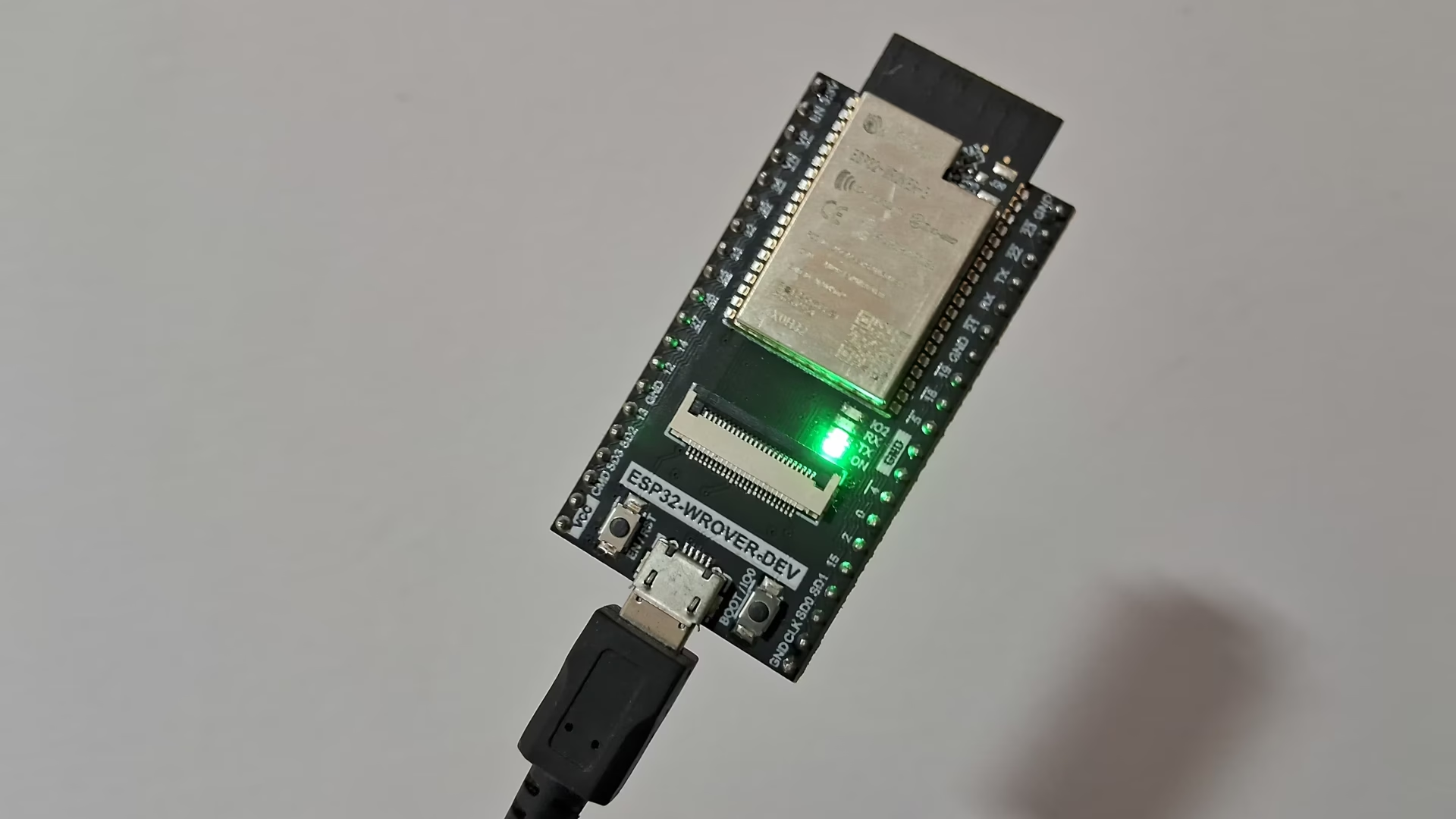
For a 240 MHz processor with 4 MB of flash, execution was surprisingly smooth. I would even say it is viable for local deployments of anything an user wants to serve over a secure TLS connection (Streams could indeed replace WebSockets).
That is it for this post. Unfortunately I couldn't extend the work from the previous post because there are no no_std protobuf codecs or available CAM drivers for the evaluated board.
Notes:
- TCP Handshake: SYN -> SYN-ACK -> ACK
- TLS Handshake: ClientHello -> ServerHello + EncryptedExtensions + Certificate + CertificateVerify + Finished -> Finished
- HTTP/2 Handshake: Preface + SettingsFrame -> SettingsFrame